
The Schemes of Work interface is used to manage weekly teaching schemes and record the planned activities for a subject during a particular week and term.
The interface provides a description indicating that schemes of work are used to manage weekly schemes, teacher progress, resources, supervisor comments, and term-based records.
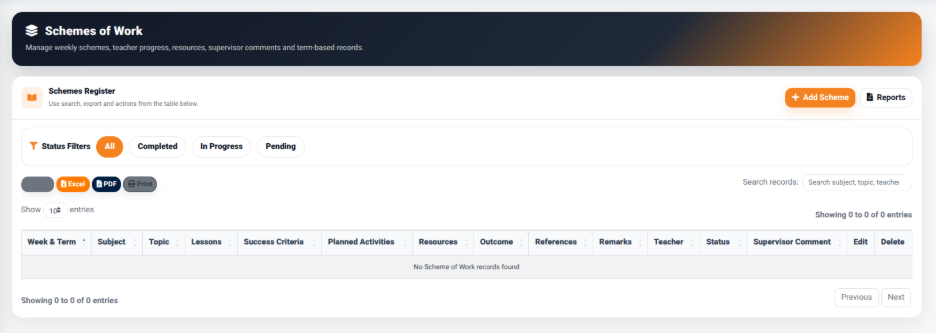
The Schemes Register provides access to existing scheme records and contains controls for adding, searching, filtering, exporting, and managing scheme information.
The main actions available include:
- Add Scheme — Opens the scheme management form for creating a new scheme of work.
- Reports — Provides access to scheme-related reports.
- Excel — Exports the displayed scheme information to Excel.
- PDF — Generates a PDF version of the displayed scheme records.
- Print — Provides a printable version of the displayed information.
- Search Records — Allows users to search for schemes using information such as subject, topic, or teacher.
Scheme Status Filters
The Schemes Register provides status filters that allow users to organize scheme records according to their current progress.
The available filters include:
- All — Displays all available scheme records.
- Completed — Displays schemes that have been completed.
- In Progress — Displays schemes that are currently being worked on.
- Pending — Displays schemes that have not yet been completed.
These filters make it easier for users to identify schemes according to their current status.
Scheme Records
The Schemes Register displays scheme information in a structured table.
The table includes:
- Week & Term — Identifies the teaching week and academic term.
- Subject — Identifies the subject associated with the scheme.
- Topic — Displays the topic being covered.
- Lessons — Indicates the number of lessons planned.
- Success Criteria — Describes the expected success criteria.
- Planned Activities — Displays the activities planned for the teaching period.
- Resources — Identifies the resources required.
- Outcome — Records the expected or achieved outcome.
- References — Provides references associated with the scheme.
- Remarks — Provides additional comments.
- Teacher — Identifies the teacher responsible for the scheme.
This structure allows users to review the teaching plan for each subject and week from a single location.