
The Income Transactions function is used to record, monitor, search, filter, and report school income transactions.
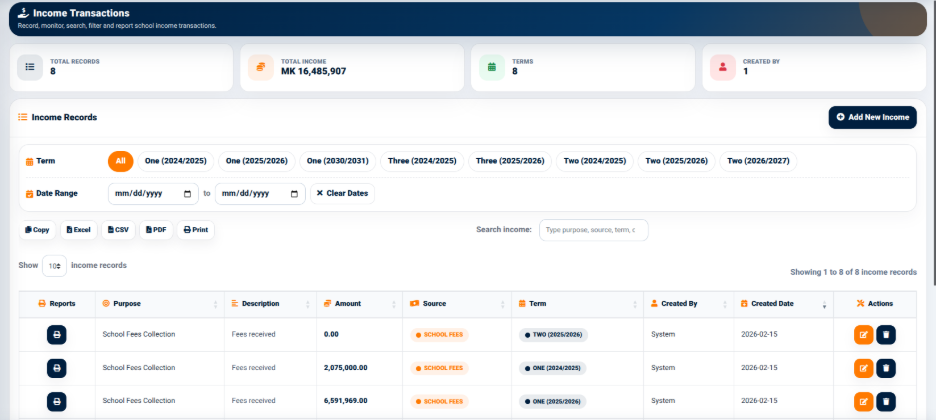
The interface provides summary indicators including:
- Total Records — Displays the number of income records.
- Total Income — Displays the total income recorded.
- Terms — Displays the number of terms associated with the income records.
- Created By — Displays the number of users associated with the recorded transactions.
These indicators provide a quick overview of the income records before individual transactions are reviewed.
Income Records
The Income Records section displays individual income transactions in a structured table.
The interface provides term filters that allow users to view income records according to the selected academic term.
The interface also provides date-range filters including:
- From Date — Defines the starting date for the income search.
- To Date — Defines the ending date for the income search.
- Clear Dates — Clears the selected date range.
A separate search field allows users to search income records using available transaction information.
The output controls include:
- Copy — Copies the displayed information.
- Excel — Exports the income information to Excel.
- CSV — Exports the income information in CSV format.
- PDF — Generates a PDF version of the income information.
- Print — Opens the information in a print-ready format.
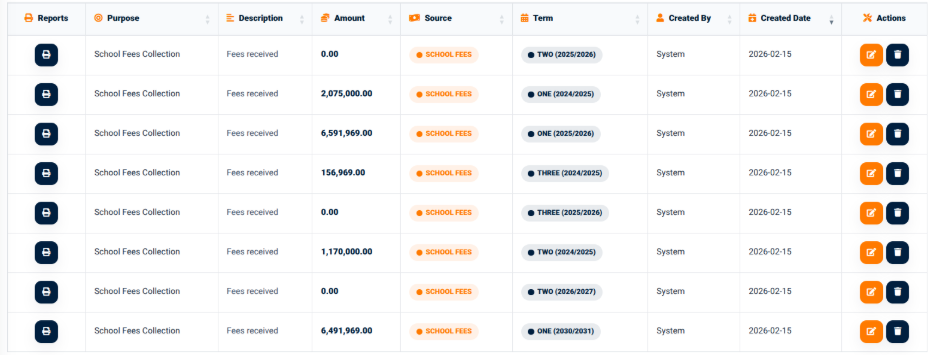
The income records table provides information including:
- Purpose — Identifies the purpose of the income.
- Description — Provides additional information about the income.
- Amount — Displays the income amount.
- Source — Identifies the source of the income.
- Term — Identifies the academic term associated with the transaction.
- Reports — Provides access to available report actions.
Adding an Income Transaction
The Add New Income function provides an interface for recording a new income transaction.
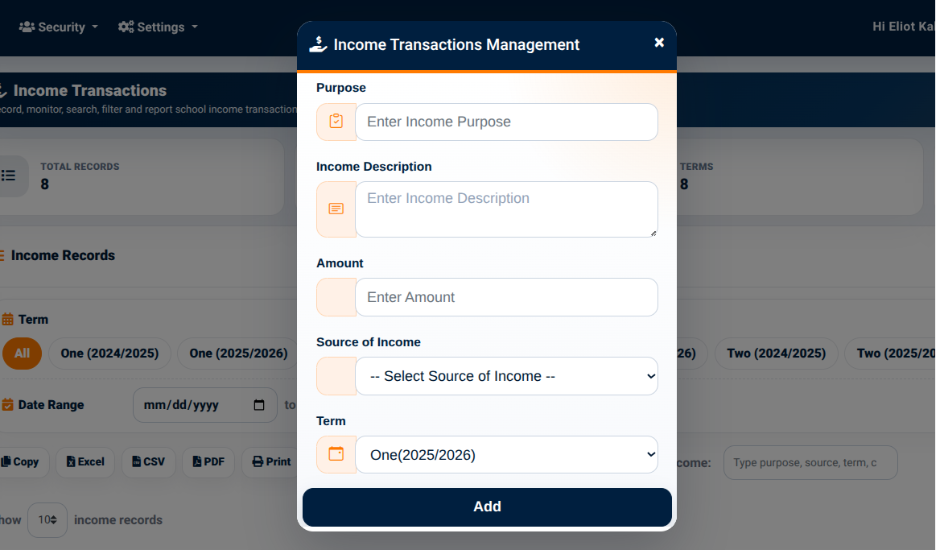
The form provides the following fields:
- Income Purpose — Used to enter the purpose of the income.
- Income Description — Used to provide a description of the income.
- Amount — Used to enter the income amount.
- Source of Income — Used to select the source of the income.
- Term — Used to select the academic term associated with the transaction.
The Source of Income field provides options including:
- School Fees
- Donation
- Others
- Billing
The Save action is used to record the income transaction.