
The Approve Lesson Plan function provides an interface for reviewing submitted lesson plans and monitoring their checking status.
The interface is identified as Lesson Plan Approval and provides a description indicating that it is used to review, approve, search, export, and manage submitted lesson plans.
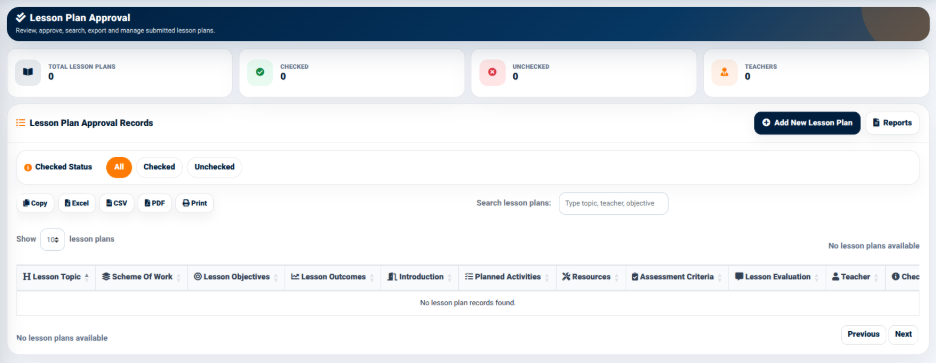
The interface provides summary indicators including:
- Checked — Displays the number of lesson plans that have been checked.
- Total Lesson Plans — Displays the total number of lesson plans available for review.
- Unchecked — Displays the number of lesson plans that have not yet been checked.
- Teachers — Displays the number of teachers represented in the lesson plan records.
These indicators provide a quick overview of the lesson-plan review position.
Checked Status Filters
The Lesson Plan Approval interface provides filters based on the checking status of lesson plans.
The available filters include:
- All — Displays all lesson plans.
- Checked — Displays lesson plans that have been checked.
- Unchecked — Displays lesson plans that have not been checked.
These filters help users focus on lesson plans requiring review or verify lesson plans that have already been checked.
Lesson Plan Approval Records
The Lesson Plan Approval Records table displays submitted lesson plans and their review information.
The displayed columns include:
- Lesson Topic
- Scheme of Work
- Lesson Objectives
- Lesson Outcomes
- Introduction
- Planned Activities
- Teacher
- Checked Status
The search field allows users to search lesson plans using information such as the topic, teacher, or objective.
The interface also provides export and printing options:
- Copy
- Excel
- CSV
These options allow lesson-plan approval information to be copied, exported, or printed for administrative and review purposes.