
The Expense Requests function is used to record and manage requests for school expenditure.
It provides an interface for reviewing expense requests, filtering records, searching for requests, updating existing requests, and deleting records where permitted.
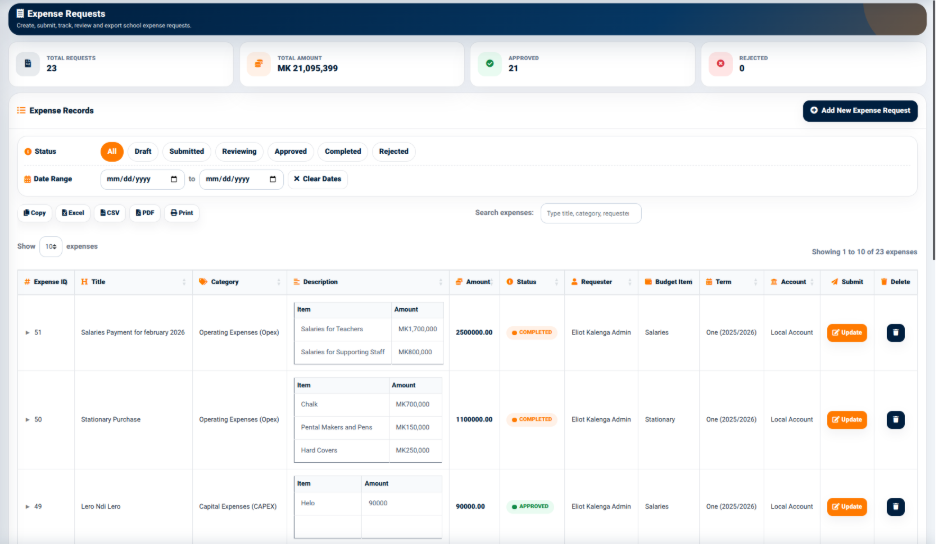
The expense records are displayed in a structured table.
Expense Records
The Expense Records section provides information including:
- Expense ID — Identifies the expense request.
- Title — Displays the title of the expense request.
- Category — Identifies the expense category.
- Amount — Displays the requested amount.
- Status — Indicates the current approval or completion status.
- Submit — Provides an action for updating the expense request.
- Delete — Provides an option for deleting the expense record where permitted.
The expense status indicates the current position of the request. The system displays statuses such as Approved and Completed.
Expense Filters and Search
The Expense Requests interface provides filtering controls for locating expense records.
The available controls include:
- Date Range — Allows users to specify the period for which expense records should be displayed.
- Clear Dates — Clears the selected date range.
- Search Expenses — Allows users to search using information such as the title, category, or requester.
The interface also provides output controls including:
- Copy
- Excel
- CSV
These controls allow users to copy, export, save, or print the displayed expense information.
Expense Request Details
The details section of an expense record provides additional information about the request.
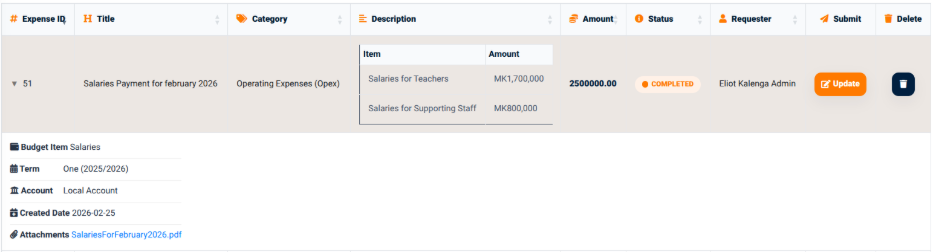
The displayed information may include:
- Requester — Identifies the user who submitted the request.
- Budget Item — Identifies the budget item associated with the request.
- Term — Identifies the academic term.
- Account — Identifies the account associated with the request.
- Created Date — Displays the date on which the request was created.
- Attachments — Provides access to supporting documents attached to the request.
The Description section provides the individual items and amounts included in the expense request.
This information allows users to review the details supporting an expense request before or after its approval.