
The Roles Management function provides the interface for creating and managing system roles.
Roles are used to group permissions and determine the type of access that users assigned to a particular role receive.
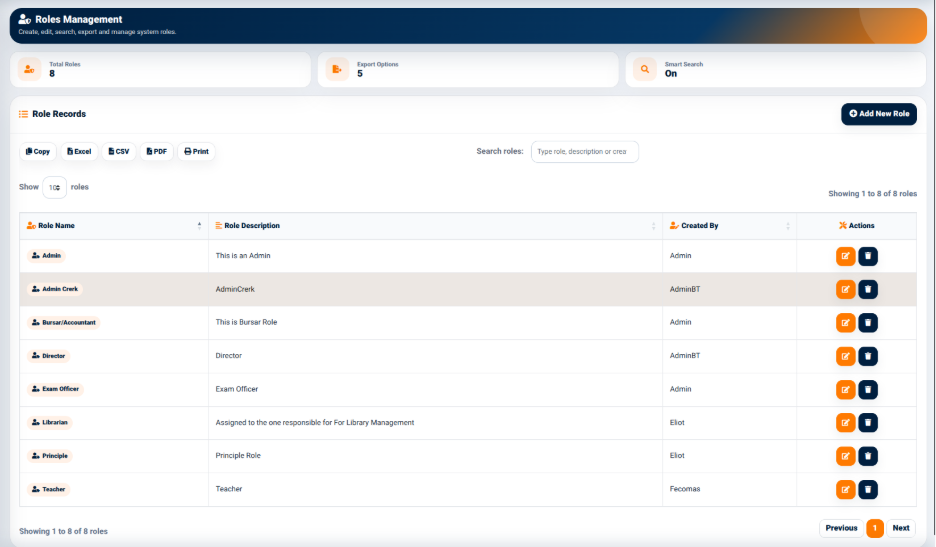
The interface provides summary information including:
- Total Roles — Displays the number of roles currently configured.
- Export Options — Displays the available data export options.
- Smart Search — Indicates whether smart search is enabled.
Role Records
The Role Records section displays the roles configured within the system.
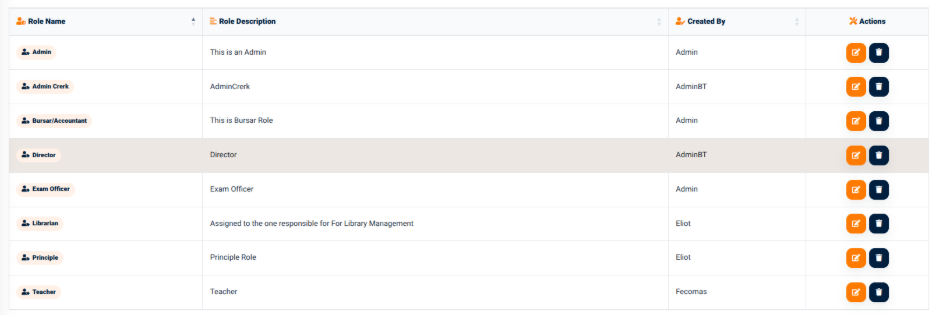
The table provides information including:
- Role Name — Displays the name of the role.
- Role Description — Provides a description of the role.
- Created By — Identifies the user who created the role.
- Actions — Provides available actions for managing the role.
The interface provides a search field for locating roles using the role name, description, or other available information.
Example Roles
The recording demonstrates several example roles, including:
- Admin
- Admin Clerk
- Bursar/Accountant
- Director
- Exam Officer
- Librarian
- Principle
- Teacher
These roles are examples of one possible school configuration only.
The system does not require every school to use these exact roles. Each school can create roles that reflect its own organizational structure, responsibilities, and access requirements.
For example, a school may create roles based on its administrative structure, teaching responsibilities, finance operations, examination responsibilities, library operations, or other functions.