
The Budget function provides an interface for creating and monitoring school budgets.
It allows authorized users to create budget records, review existing budgets, search for budget information, monitor budget performance, and prepare budget items.
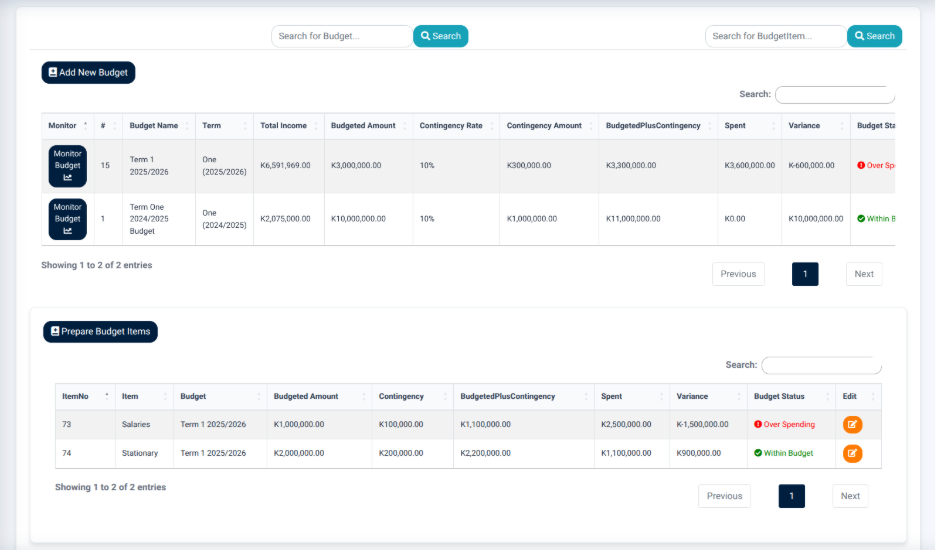
The interface provides search controls for locating budget records and budget items.
The main actions available include:
- Add New Budget — Opens the budget form for creating a new budget.
- Monitor Budget — Opens the budget monitoring report for the selected budget.
- Prepare Budget Items — Provides access to the budget item preparation interface.
Budget Records
The Budget Records section displays individual budget records in a structured table.

The table provides information including:
- Budget Name — Identifies the budget.
- Term — Identifies the academic term associated with the budget.
- Total Income — Displays the total income associated with the budget.
- Budgeted Amount — Displays the amount allocated to the budget.
- Contingency Rate — Displays the contingency percentage.
- Contingency Amount — Displays the contingency amount.
- Budgeted Plus Contingency — Displays the combined budgeted amount and contingency.
- Spent — Displays the amount spent against the budget.
- Monitor — Provides access to the budget monitoring report.
The budget records allow users to compare the planned budget with the amount already spent.
Budget Monitoring
The Monitor Budget function provides a detailed budget monitoring report.
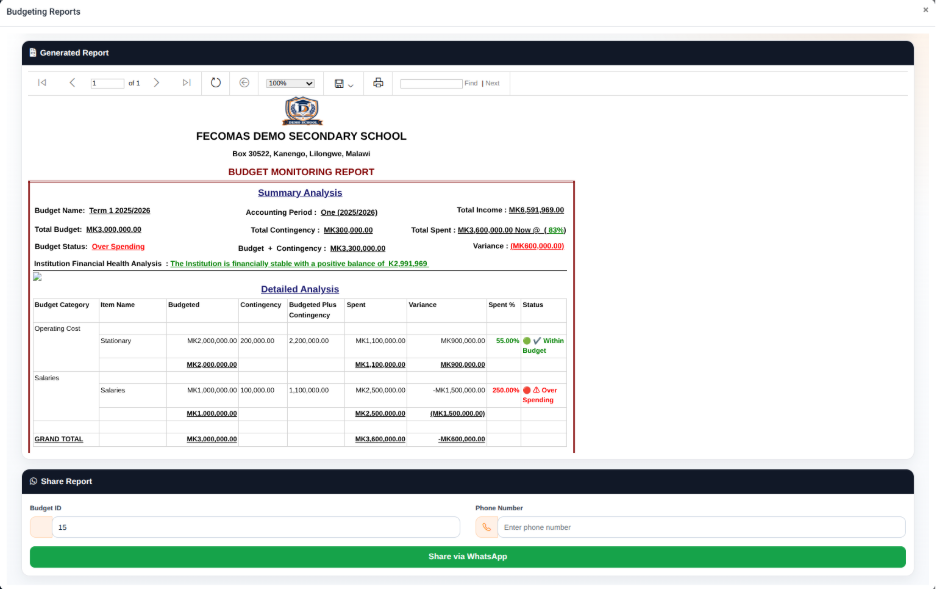
The report provides a Summary Analysis section containing information including:
- Budget Name — Identifies the budget being reviewed.
- Accounting Period — Identifies the accounting period.
- Total Income — Displays the total income for the accounting period.
- Total Budget — Displays the total budget.
- Total Contingency — Displays the contingency amount.
- Total Spent — Displays the amount spent.
- Budget Status — Indicates the current budget position.
- Budget + Contingency — Displays the budget together with the contingency amount.
- Variance — Displays the difference between the budgeted amount and spending position.
- Institution Financial Health Analysis — Provides an overall financial assessment based on the displayed financial information.
The report also provides a Detailed Analysis section.
The detailed analysis provides information including:
- Budget Category — Identifies the budget category.
- Item Name — Identifies the individual budget item.
- Budgeted — Displays the amount allocated to the item.
- Contingency — Displays the contingency amount.
- Budgeted Plus Contingency — Displays the combined amount.
- Spent — Displays the amount spent.
- Variance — Displays the difference between the planned and spent amounts.
- Spent % — Displays the percentage of the budget that has been spent.
- Status — Indicates the current position of the budget item.
This report allows users to monitor budget performance at both overall and individual budget-item levels.
Budget Reports
The Budget Reports interface provides a dedicated area for generating and reviewing budget monitoring information.
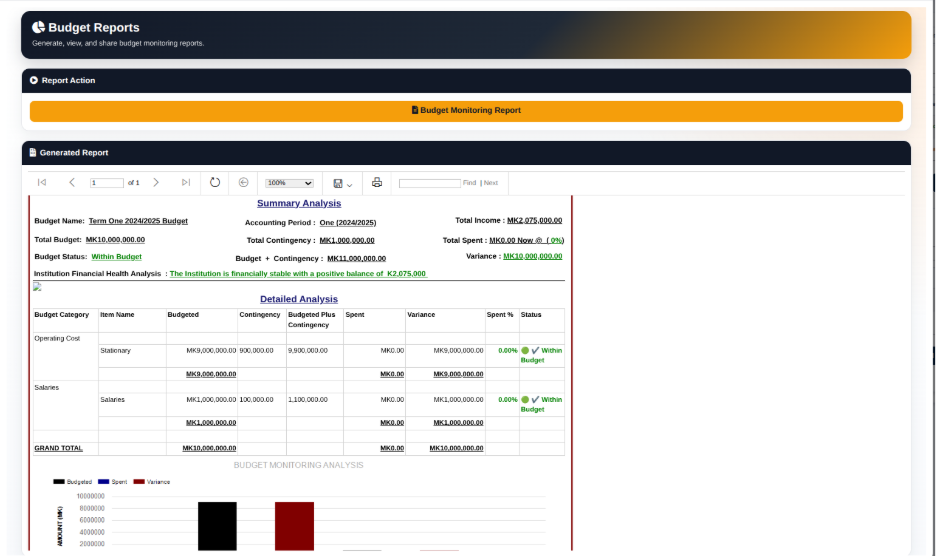
The interface contains a Report Action section with the Budget Monitoring Report option.
The Generated Report section provides controls for reviewing the generated report, including navigation, zoom, save, print, and search functions.