
The Library Inventory interface is used to manage the individual physical copies of books available in the library.
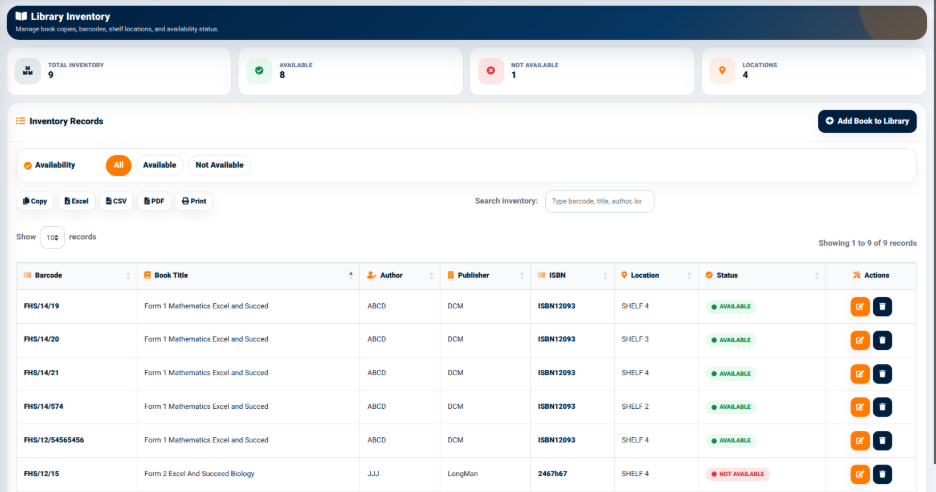
While Books Management stores the main catalogue information, Library Inventory provides information about each physical copy, including its barcode, location, and availability status.
The interface provides summary indicators including:
- Total Inventory — Displays the total number of physical book copies registered in the inventory.
- Available — Displays the number of book copies currently available.
- Not Available — Displays the number of copies that are currently unavailable.
- Locations — Displays the number of library locations represented in the inventory.
These indicators provide a quick overview of the current physical library inventory.
Inventory Availability Filters
The Inventory Records section provides filters based on the availability of physical book copies.
The available filters include:
- All — Displays all inventory records.
- Available — Displays book copies that are currently available.
- Not Available — Displays book copies that are currently unavailable.
These filters allow library staff to quickly identify books that can be borrowed and books that are currently unavailable.
Inventory Search and Export
The Library Inventory interface provides a search field for locating specific inventory records.
Users can search using information such as:
- Barcode
- Book Title
- Author
- Location
The interface also provides:
- Copy
- Excel
- CSV
These options allow inventory information to be copied, exported, generated as a PDF, or printed.
Inventory Records
The Inventory Records table displays information about individual physical copies of library books.
The table includes:
- Barcode — Identifies the individual physical copy.
- Book Title — Identifies the book associated with the copy.
- Author — Displays the author.
- Publisher — Displays the publisher.
- ISBN — Displays the ISBN.
- Location — Identifies the physical shelf or library location.
- Status — Displays the current availability status of the copy.
- Actions — Provides available actions for managing the inventory record.
Using a unique barcode for each physical copy allows individual copies of the same book title to be tracked separately.