
The Rooms Management function provides an interface for managing rooms associated with the available hostels.
It allows authorized users to create rooms, review room records, search for rooms, export room information, and manage individual room records.
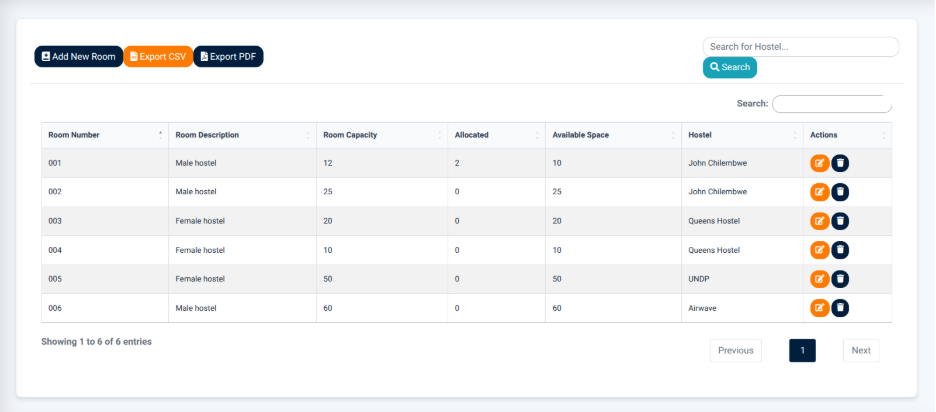
The interface provides the following main actions:
- Add New Room — Opens the Rooms Management form for creating a new room.
- Export CSV — Exports the displayed room information in CSV format.
- Export PDF — Generates a PDF version of the displayed room information.
- Search — Allows users to search for room records.
Room Records
The Room Records section displays rooms in a structured table.
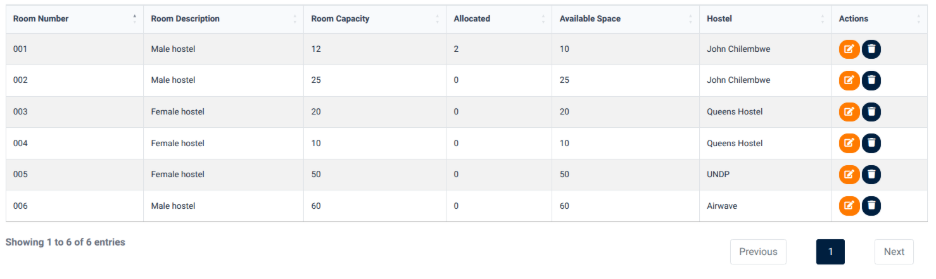
The table provides information including:
- Room Number — Identifies the room.
- Room Description — Provides a description of the room.
- Room Capacity — Displays the maximum number of students that can be accommodated.
- Allocated — Displays the number of students currently allocated to the room.
- Available Space — Displays the remaining available space in the room.
- Hostel — Identifies the hostel to which the room belongs.
- Actions — Provides available actions for the individual room record.
The room information allows users to monitor room capacity and available space before carrying out hostel allocation operations.
Adding a New Room
The Add New Room function provides a form for entering the information required to create a room.
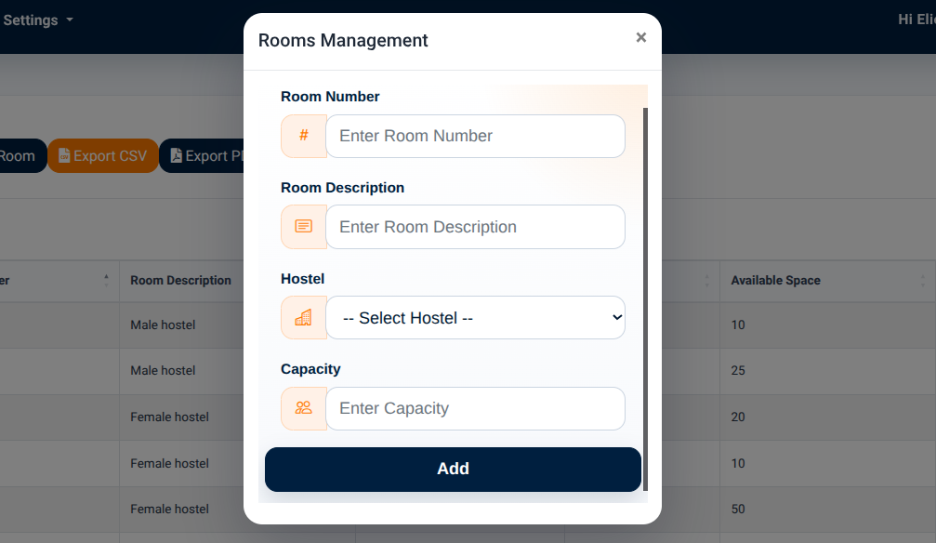
The form provides the following fields:
- Room Number — Used to enter the room number.
- Room Description — Used to provide a description of the room.
- Hostel — Used to select the hostel to which the room belongs.
- Capacity — Used to specify the room capacity.
The Add action is used to save the room information and create the room record.