
The User Management function provides the main interface for managing system user accounts.
It allows authorized users to create new accounts, review existing users, search for users, export user information, edit user records, and manage account status.
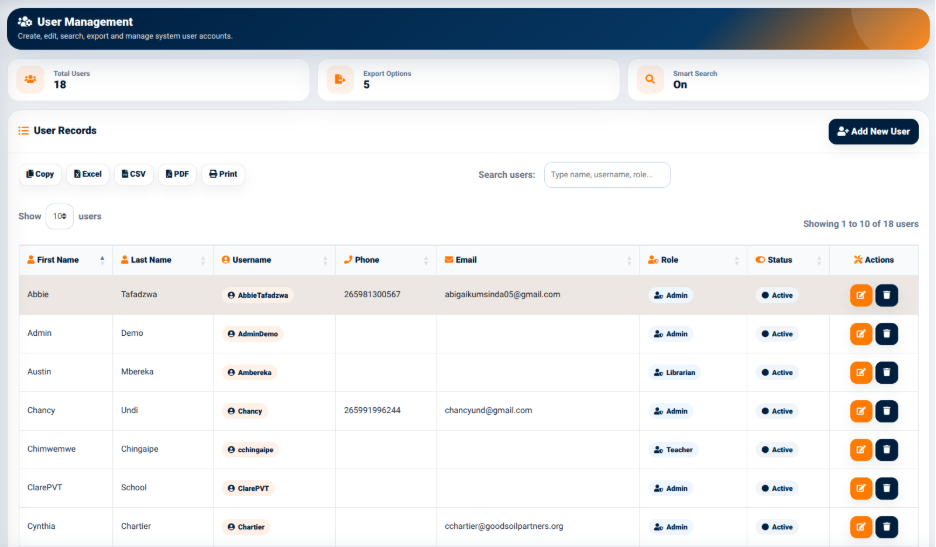
The User Management interface provides summary information including:
- Total Users — Displays the total number of user accounts recorded in the system.
- Export Options — Displays the number of available export options.
- Smart Search — Indicates whether the smart search functionality is enabled.
User Records
The User Records section displays system users in a structured table.
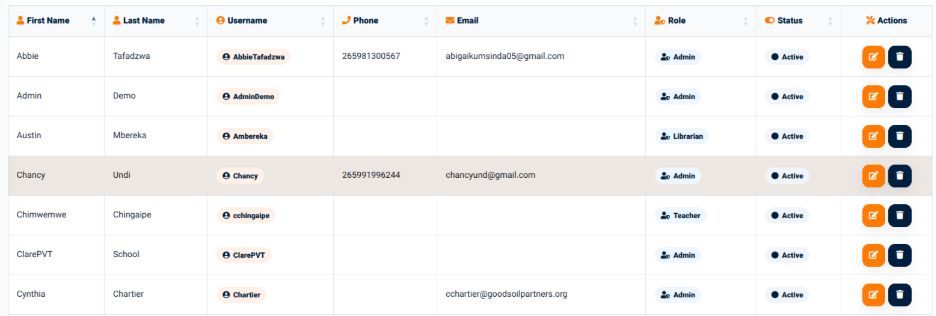
The table provides information including:
- First Name — Displays the user’s first name.
- Last Name — Displays the user’s last name.
- Username — Displays the username used to access the system.
- Phone — Displays the user’s phone number.
- Email — Displays the user’s email address.
- Role — Displays the role assigned to the user.
- Status — Displays the current account status.
- Actions — Provides available actions for the user account.
The interface provides a search field for locating users using information such as their name, username, or role.
User Export Options
The User Management interface provides several options for exporting or copying user information.
The available options include:
- Copy — Copies the displayed user information.
- Excel — Exports the user information to Excel.
- CSV — Exports the user information in CSV format.
- PDF — Generates a PDF version of the user information.
- Print — Opens the information in a print-ready format.
These functions allow authorized users to extract user account information for administrative and reporting purposes.