
The Attendance module provides an attendance scanning interface for capturing student attendance using a barcode or QR code.
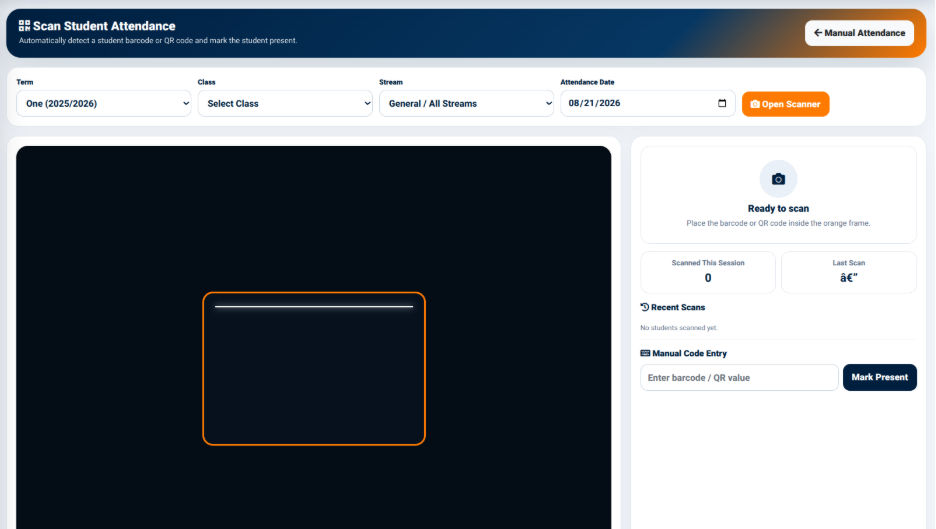
The scanner provides a scanning area where the barcode or QR code is positioned within the designated frame.
The interface displays information including:
- Ready to scan — Indicates that the scanner is ready to receive a barcode or QR code.
- Scanned This Session — Displays the number of students scanned during the current session.
- Last Scan — Displays information relating to the most recent scan.
- Recent Scans — Displays recently scanned students.
The scanner also provides a Manual Code Entry option.
The Enter barcode / QR value field allows a user to manually enter a barcode or QR value when scanning is not being used.
The Mark Present button is used to mark the student associated with the entered code as present.
Camera Controls
The attendance scanner provides camera controls for managing the scanning session.
The available controls include:
- Start / Resume — Starts or resumes the camera scanner.
- Switch Camera — Allows the user to switch between available cameras.
- Stop Camera — Stops the active camera.
The scanner indicates that camera access requires HTTPS and that camera images are not uploaded or stored.