
The Settings interface is used to configure rules that control how attendance can be recorded and processed.
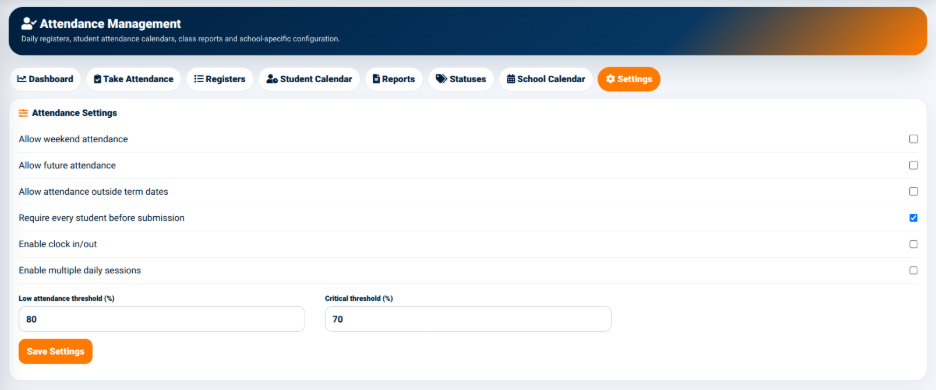
The available attendance settings include:
- Allow weekend attendance — Controls whether attendance can be recorded on weekends.
- Allow future attendance — Controls whether attendance can be recorded for future dates.
- Allow attendance outside term dates — Controls whether attendance can be recorded outside the configured academic term dates.
- Require every student before submission — Controls whether every student must have an attendance status before attendance can be submitted.
- Enable clock in/out — Controls whether clock-in and clock-out functionality is enabled.
- Enable multiple daily sessions — Controls whether multiple attendance sessions can be recorded within a single day.
These settings allow the school to configure attendance behavior according to its operational requirements.
Attendance Thresholds
The Attendance Settings interface also provides percentage thresholds.
The available fields include:
- Low Attendance Threshold (%) — Used to define the percentage at which attendance is considered low.
- Critical Threshold (%) — Used to define the percentage at which attendance reaches the critical level.
The Save Settings button is used to apply the configured attendance settings.
These thresholds provide the system with defined levels for identifying attendance that may require attention.