
The Statuses interface is used to configure the attendance statuses available when recording student attendance.
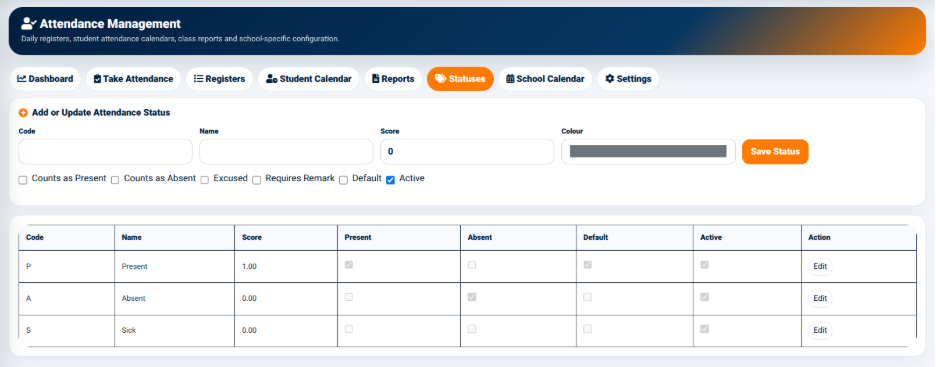
The Add or Update Attendance Status section is used to create or modify an attendance status.
The available fields include:
- Code — Used to define the short code representing the attendance status.
- Name — Used to enter the name of the attendance status.
- Score — Used to assign a score to the status.
- Colour — Used to select the colour associated with the status.
The interface also provides configuration options for determining how the status affects attendance calculations.
These options include:
- Counts as Present — Determines whether the status is counted as present.
- Counts as Absent — Determines whether the status is counted as absent.
- Excused — Indicates that the attendance status represents an excused attendance condition.
- Requires Remark — Indicates whether a remark should be provided when the status is selected.
- Default — Determines whether the status is configured as the default status.
- Active — Determines whether the status is currently available for use.
The Save Status button is used to save the attendance status.
Attendance Status Records
The status records are displayed in a structured table.
The table includes:
- Code — Displays the status code.
- Name — Displays the status name.
- Score — Displays the assigned score.
- Present — Indicates whether the status counts as present.
- Absent — Indicates whether the status counts as absent.
- Default — Indicates whether the status is the default status.
- Active — Indicates whether the status is currently active.
- Action — Provides the available management action.
The Edit action allows an authorized user to modify an existing attendance status.