
The Lesson Plan Management interface provides a structured form for recording the details of an individual lesson.
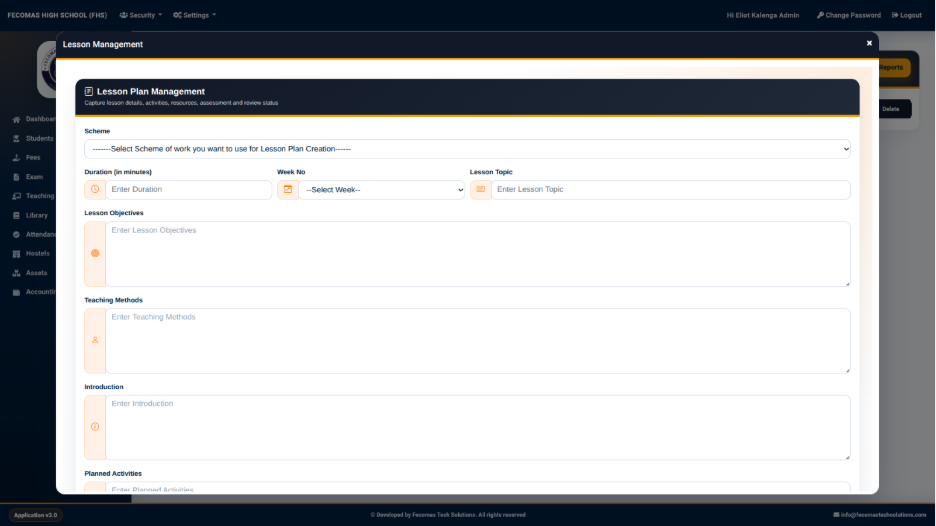
The form begins with the selection of the scheme of work that will be used as the basis for the lesson plan.
Scheme Selection
The Scheme field is used to select the scheme of work associated with the lesson plan.
The system provides a selection field with the instruction:
Select Scheme of work you want to use for Lesson Plan Creation
Selecting a scheme links the lesson plan to the relevant teaching scheme.
Lesson Information
The lesson information section provides the following fields:
- Duration (in minutes) — Used to specify the expected duration of the lesson.
- Week No — Used to select the teaching week.
- Lesson Topic — Used to enter the topic covered by the lesson.
These fields establish the basic timing and subject matter of the lesson.
Lesson Objectives
The Lesson Objectives field is used to describe what learners are expected to achieve during the lesson.
The objectives should clearly describe the intended learning outcomes for the lesson.
Teaching Methods
The Teaching Methods field is used to record the methods that will be used to deliver the lesson.
This provides a dedicated area for documenting how the teacher intends to conduct the lesson.