
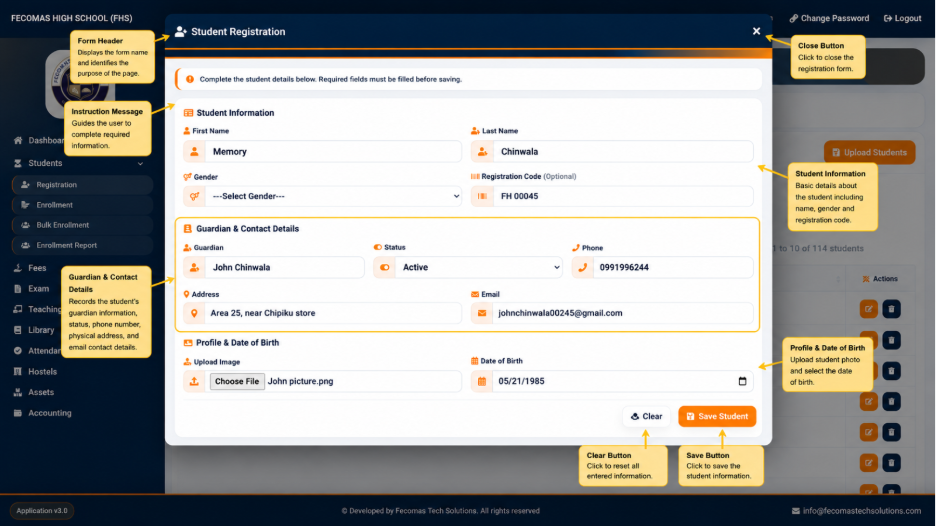
The Student Registration function is used to create a new student record in the system. It provides a structured registration form through which the user’s basic student information and guardian or contact information can be entered.
The registration screen provides sections for entering student information and guardian or contact details.
Student Information
The Student Information section contains fields used to identify and record the student’s basic information.
The displayed fields include:
- First Name — Used to enter the student’s first name.
- Last Name — Used to enter the student’s last name.
- Gender — Used to select the student’s gender.
- Registration Code — Provides a field for entering the student’s registration code where applicable.
The registration interface also provides an option for entering additional student information where required by the system.
Guardian and Contact Details
The Guardian & Contact Details section provides information relating to the student’s guardian and communication details.
The displayed fields include:
- Guardian Name — Used to identify the student’s guardian.
- Status — Used to select the applicable status.
- Phone — Used to enter the guardian or contact telephone number.
- Address — Used to record the physical or postal address.
- Email — Used to record an email address where applicable.
The information entered in this section provides additional contact information associated with the student record.
Completing Student Registration
The registration form allows the authorized user to enter the required student and contact information before submitting the record.
The registration process therefore provides a method for creating an individual student record directly within the system rather than requiring student information to be entered through a separate application.
After the registration operation is completed, the student becomes available within the Students management area for further student and enrollment-related activities.