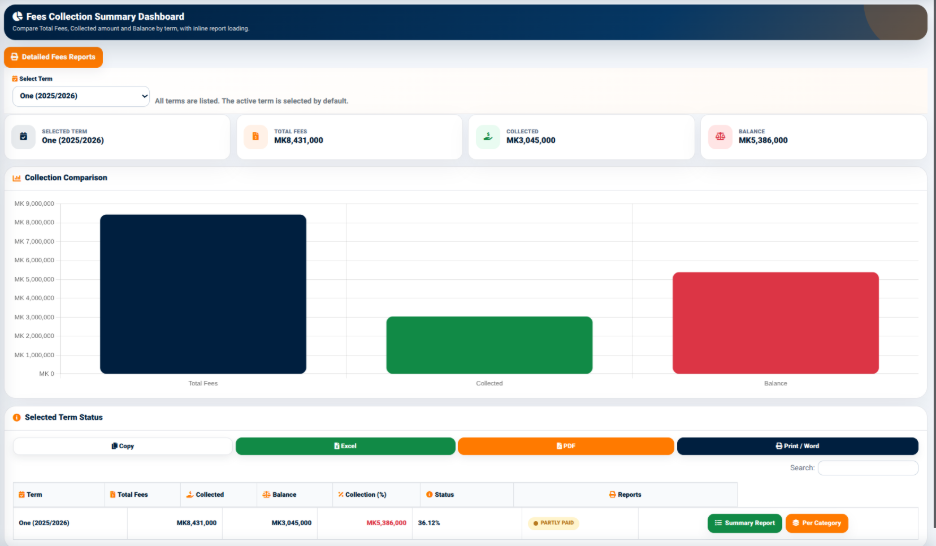
The School Fees Reports function provides a reporting dashboard for reviewing fee collection information and comparing the total fees, collected amount, and outstanding balance for a selected academic term.
The dashboard provides a Select Term option. The active term is selected by default, while other available terms can be selected when required.
The dashboard displays summary indicators for the selected term, including:
These indicators provide a quick financial overview of the selected term.
The Collection Comparison section presents the selected term’s fee information visually.
The comparison displays the relationship between:
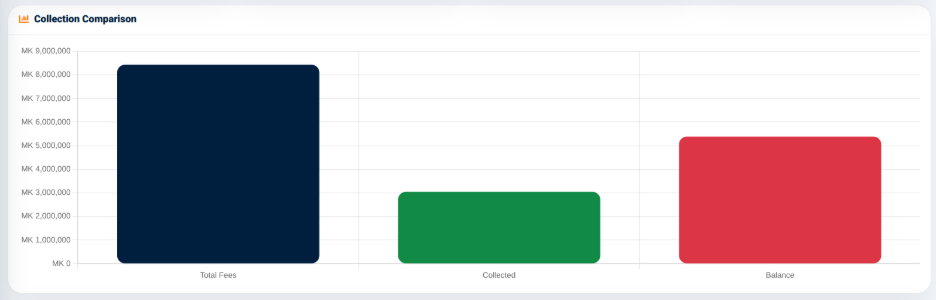
The graphical presentation allows users to quickly compare the amount billed against the amount collected and the remaining balance.
The interface also provides a Detailed Fees Reports option for accessing more detailed fee information.