Attendance Dashboard
The Attendance Dashboard provides an overview of student attendance for a selected term and date.
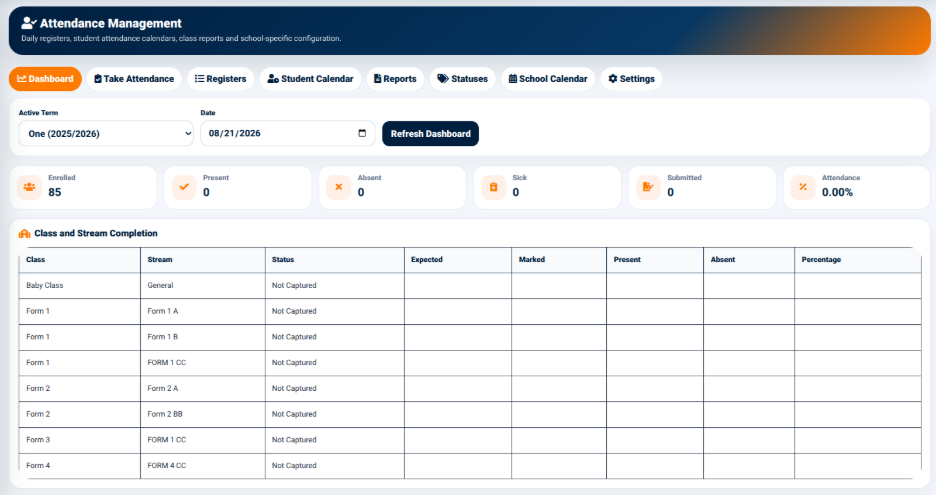
The dashboard provides filters for selecting the attendance period.
The available fields include:
- Active Term — Used to select the academic term for which attendance information should be displayed.
- Date — Used to select the attendance date.
The Refresh Dashboard button is used to reload the attendance information according to the selected term and date.
Attendance Summary
The dashboard provides summary cards showing the current attendance position.
The summary indicators include:
- Enrolled — Displays the total number of students enrolled for the selected attendance context.
- Present — Displays the number of students marked as present.
- Absent — Displays the number of students marked as absent.
- Sick — Displays the number of students recorded as sick.
- Submitted — Displays the number of attendance records that have been submitted.
- Attendance — Displays the calculated attendance percentage.
These summary indicators provide users with a quick overview of attendance performance without requiring them to review individual student records.
Class and Stream Completion
The Class and Stream Completion section provides an overview of attendance capture for individual classes and streams.
- Class — Identifies the class.
- Stream — Identifies the stream associated with the class.
- Status — Displays the current attendance capture status.
- Expected — Indicates the expected attendance records.
- Marked — Indicates the number of attendance records that have been marked.
- Present — Displays the number of students marked present.
- Absent — Displays the number of students marked absent.
- Percentage — Displays the attendance percentage.
The Status column allows users to identify whether attendance for a class or stream has been captured.