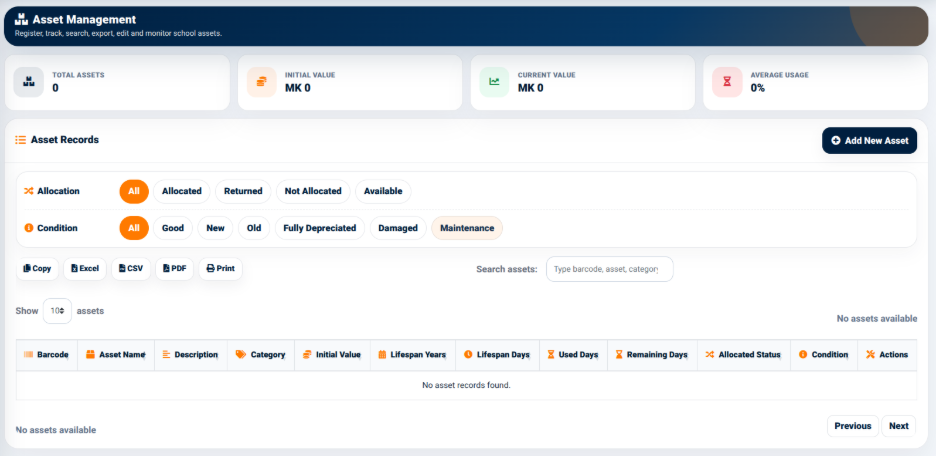
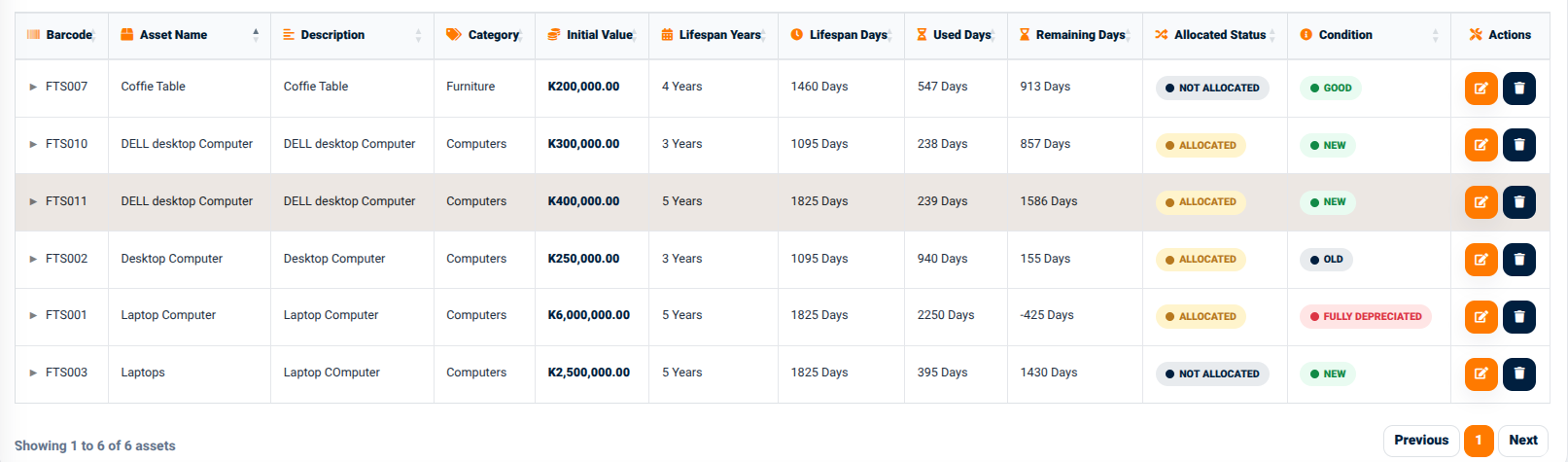
The Asset Management function provides the main interface for registering and managing school assets. It allows authorized users to create asset records, review existing assets, search for specific assets, monitor allocation status and condition, and review asset lifespan information.
The interface provides summary information at the top of the page, including:
Total Assets — Displays the number of assets currently recorded in the system.
Initial Value — Displays the total initial value of the recorded assets.
Current Value — Displays the current value of the recorded assets.
Average Usage — Displays the average usage percentage of the recorded assets.
These summary indicators provide a quick overview of the current asset position before individual records are reviewed.
Asset Records
The Asset Records section displays individual assets in a structured table.
The interface provides allocation status filters that allow users to view assets according to their current allocation position:
All — Displays all available asset records.
Allocated — Displays assets currently assigned to an asset holder.
Returned — Displays assets that have been returned.
Not Allocated — Displays assets that are not currently allocated.
Available — Displays assets available for allocation.
The interface also provides condition filters including:
All — Displays assets regardless of condition.
Good — Displays assets recorded as being in good condition.
New — Displays newly recorded or new-condition assets.
Old — Displays assets recorded as old.
Fully Depreciated — Displays assets that have reached full depreciation.